
Installation and use of Forex EA files
Many foreign exchange novices have downloaded a lot of EA, but they don't know how to install and use it. Today, Besty has a simple tutorial for everyone to learn:
1. I downloaded EA, which folder should I put it in?
First of all, of course, unzip the downloaded ea file and see that the file format is .ex4. After that, look for the folder of the MT4 client. In this folder, find a folder of experts. EA will be displayed directly in the above folder. As shown in the figure:
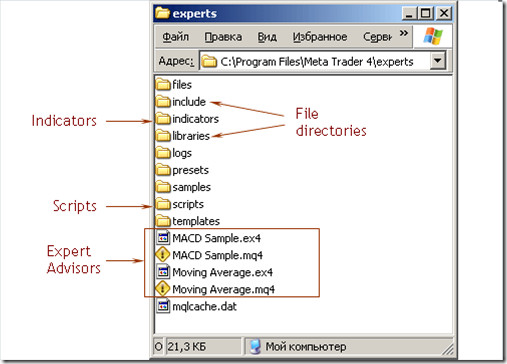
After opening this folder, drag the EA file you want to use directly into it, and the EA can be used on your client side. It should be noted that we can see that there are 2 different EA files with different suffixes in the picture. The file you drag in to run must be a file with the ex4 suffix.
If your EA file on your computer has the mq4 suffix, you must first compile it into a file with the same filename but the suffix ex4.
If the ea contains a DLL file, place the.dll file in experts/libraries.
2. How can I check if the EA has been successfully installed?
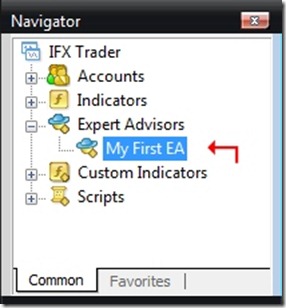
Suppose we set the name of this EA to My First EA, just open the MT4 navigation window. If you find that the EA is already in it, it means that the installation is successful. As shown in the figure:
3. After installation, how can I get this new EA to start running?
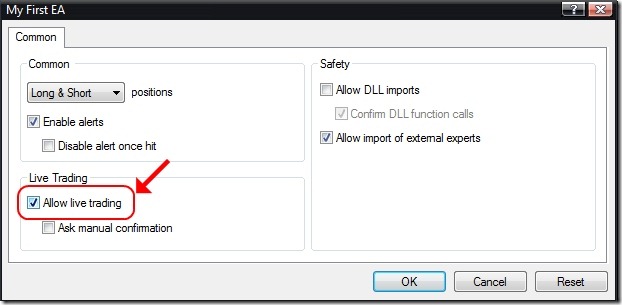
The easiest way to do this is to drag and click the mouse directly to the currency pair window you want to trade. After that, a dialog window will pop up. As shown in the figure (just tick the Allow real-time automated trading option):
4. The last step is to start the EA running.
Check the EA's on button again. The image below shows the off state:
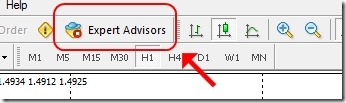
To start an EA, click this button to turn it on in green. Then if you see a smiling sign in the upper right corner of the window, your EA is running normally!
Summary: General download file placement instructions:
Copy the mq4 and ex4 files of the indicator to the indicators subdirectory of the experts directory
🥰 Copy the mq4 and ex4 files of the EA automatic trading to the experts directory
The tpl file is a template file, copy it to the templates directory
The DLL file is a library file, copy it to the libraries subdirectory of the experts directory
The SET file is the setting file, copy it to the presets subdirectory of the experts directory
The pdf, txt, and doc files are explanatory documents that can be opened directly for reading
Please indicate the source: https://www.daoctech.com/fxnews/2001.html
Disclaimer: The content of this article does not represent the views of the Institute of Foreign Exchange. The content is for reference only and does not constitute investment advice. Investors operate accordingly at their own risk.