
MT4 server address query tips
Many friends who trade in foreign exchange will notice an option to select a server when they open the MT4 software. It is often unclear where this server is located. Next, I will teach you how to check the real address of the server toAohuiThe platform, for example, is very intuitive to operate.
Click the connection status icon in the lower right corner of the interface, and the system will list multiple servers for you to choose from. The one with the checkmark is the server currently used by the software.
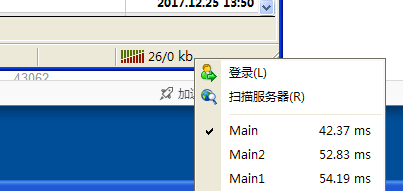
If you want to see the specific address of a server, just switch to that server first, then try to close other programs that occupy the network, and then click the Start menu to select Run.
Type cmd in the text box of the pop-up window and click ok.
Please close your MT4 software first.
In the black command window that appears, type:netstat -ano | findstr ESTABLISHED(You can also copy and paste this command directly into it), and then press Enter.
At this point, a string of Internet Protocol Addresses will appear on the screen, so ignore it for now.
Then reopen your MT4, switch to the server you want to query in the server list, and repeat the operation just now.
Enter again in the black command window:netstat -ano | findstr ESTABLISHED(Or paste the command directly), then hit Enter.
At this point, a lot of IP information will be listed again.
You only need to compare the two IP addresses that appear before and after, and those new IP addresses are usually the Internet Protocol Address of your current MT4 server. This method is also suitable for querying server information on various platforms, including Australia Exchange.
Finally, copy the found Internet Protocol Address into the search box of the search engine to find the location of the IP address, which is also the location of the MT4 server.
Please indicate the source: https://www.daoctech.com/fxnews/2624.html
Disclaimer: The content of this article does not represent the views of the Institute of Foreign Exchange. The content is for reference only and does not constitute investment advice. Investors operate accordingly at their own risk.